

Pull to refresh
Logo
Google Gemini adds in-chat editing for documents, PDFs, and presentations

Google Gemini adds in-chat editing for documents, PDFs, and presentations

New Capabilities

Users can generate, preview, and refine files directly in the Gemini chat window without switching apps

Overview

Updated 1 hour ago

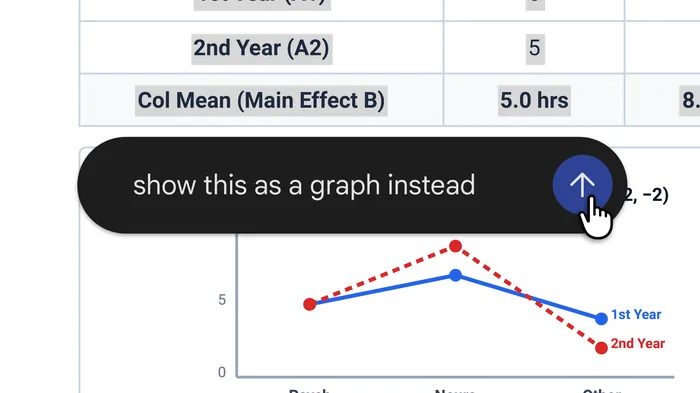
Google's Gemini app now edits the files it generates. Announced October 29, users can open PDFs, Google Docs, spreadsheets, slide decks, Markdown files, text files, and code directly in the chat window, type manual changes, highlight sections to prompt rewrites, or ask Gemini to adjust tone and layout without opening a separate document editor.

The update closes the gap between AI chat and productivity software. Before, Gemini could generate files for download, but editing meant exporting and reopening them in Docs or Sheets. Now the conversation hosts the document itself, with a full-screen view, a floating command bar for targeted prompts, and an export menu that saves locally as PDF or pushes to Google Drive.

PDF preview and editing work on both web and mobile. All other formats are web-only for now. The feature is available to every Gemini user in all supported languages, with no admin controls, and builds on Gemini's existing integrations inside Google's Workspace apps.

Why it matters

AI chat is becoming the workspace itself. Users can draft a study guide, slide deck, or spreadsheet and refine it in the same conversation; Google's Workspace integration means files generated in Gemini open directly into Docs, Sheets, or Slides, tightening its hold on the document workflow.

Questions about this story

Free account needed to ask — your question is kept and asked for you right after sign-up. Answers are public.

No questions yet — be the first to ask.

Key Indicators

7
File formats editable in Gemini chat
PDF, Google Docs, Google Sheets, slide decks, Markdown, TXT, and code
2
Platforms supporting PDF editing
Web and mobile; all other formats are web-only at launch
100
Gemini users with access
All users in all languages where the Gemini app is available

Voices

Curated perspectives — historical figures and your fellow readers.

Sign up to generate historical perspectives on this story.

Organizations Involved

Timeline

2026 October 2026

3 events Latest: Yesterday
  1. Gemini adds in-chat file editing

    Latest Product

    Google announces generation, preview, and editing for seven file formats directly in the Gemini chat window.

  2. Gemini adds file generation and download

    Product

    Google adds support for generating and downloading files directly in Gemini.

  3. Anthropic adds Claude document editing

    Product

    Anthropic allows users to generate and edit documents and presentations in Claude chats.

Scenarios

1

Gemini becomes Google's default document workspace

Likely Resolves by End of 2027

Discussed by: Google's Workspace Updates blog, Chrome Unboxed

If the feature gains traction, Gemini becomes the front door to Google's office suite: generate, edit, and refine in chat, then open in Docs, Sheets, or Slides. Google's distribution through Workspace, Gmail, and Android gives it a reach advantage over standalone AI tools.

2

OpenAI ships comparable ChatGPT in-chat editing

Likely Resolves by End of 2027

Discussed by: The Verge, industry analysts

Anthropic already offers document editing in Claude chats, and now Google offers it in Gemini. OpenAI is the remaining major AI assistant without in-chat file editing, making a comparable ChatGPT feature likely as competitive pressure builds.

3

Mobile editing remains limited to PDFs

Unlikely Resolves by End of 2027

Discussed by: Google's official announcement

PDF editing works on web and mobile, but Docs, Sheets, Slides, and code are web-only at launch. If Google does not extend mobile support, the feature stays desktop-centric, limiting its usefulness for users whose primary device is a phone or tablet.

Historical Context

2 moments from history that rhyme with this story — and how they unfolded.

October 2024

Claude Artifacts (2024)

Anthropic launched artifacts in Claude, giving AI-generated code, documents, and interactive content a dedicated side panel in the chat window. Previously, Claude output was text-only; artifacts made it usable and executable.

Then

Set a new bar for AI output quality — users could test and iterate on generated code and documents in place.

Now

Artifacts became a template for AI chat surfaces: output should be interactive, not just readable.

Why this matters now

Direct precedent for Gemini's in-chat editing. Google is matching a pattern Anthropic established two years earlier, suggesting interactive AI output is becoming standard across the industry.

2006

Google Docs moves documents to the browser (2006)

Google launched its web-based word processor, moving document creation from desktop software like Microsoft Word into the browser. The product became Google Docs and now anchors the Workspace suite.

Then

Online collaboration became standard; Microsoft responded with Office 365 and browser versions.

Now

Documents shifted from local files to cloud services, reshaping how organizations create and share work.

Why this matters now

The same migration pattern is repeating: from browser apps to AI chat as the primary document surface. Google is on both sides of this transition.

Sources

(8)