


Pull to refresh
Logo
Anthropic turns Claude artifacts into installable desktop apps

Anthropic turns Claude artifacts into installable desktop apps

New Capabilities

A beta called Install as app gives Mac and Windows users their own windows, icons, and optional file access, all running through Claude online

Overview

Updated 11 minutes ago

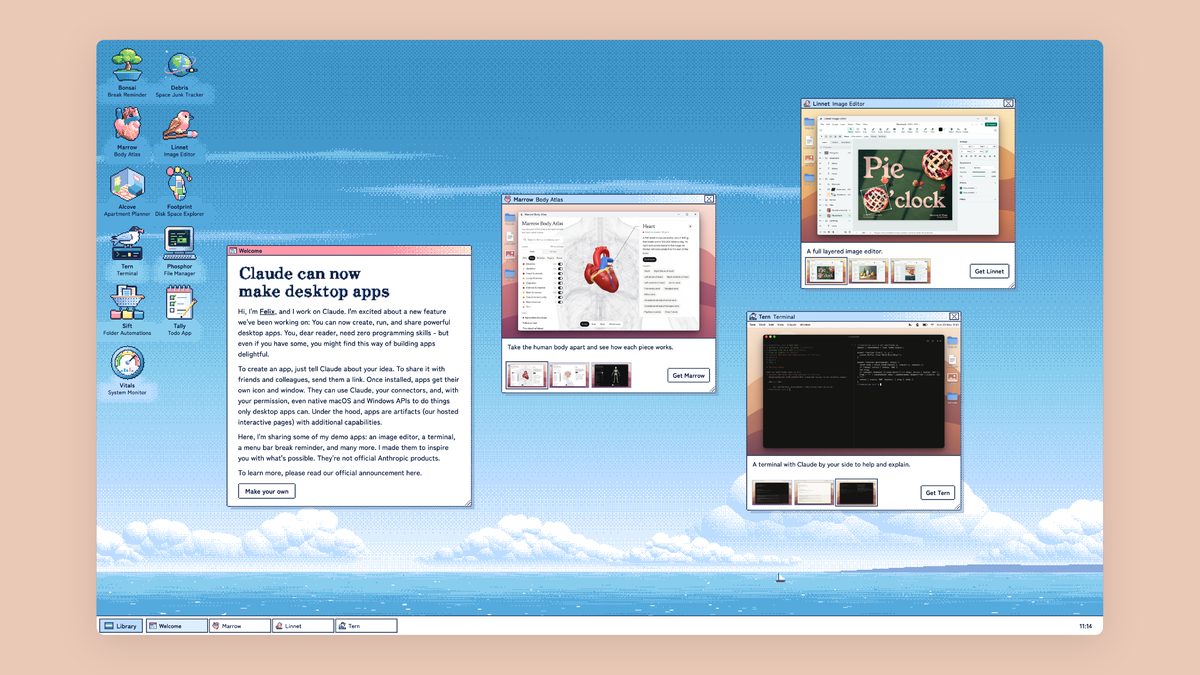
Since mid-2024, a Claude artifact has lived inside a chat window: a meeting dashboard, an order tracker, a small calculator. Close the tab and it was gone. On Nov. 24, Anthropic began rolling out a beta called Install as app that gives an artifact its own icon and its own window on a Mac or Windows machine.

The app is still the artifact: edit it in Claude and every installed copy changes, and it runs on your existing account with no packaging, code signing, or API key. Permissions come in three tiers, from browser-level access up to running programs and deleting files without asking again, and each new version has to request them. The caveat is the connection — every installed app needs an internet link and a signed-in Claude session to open.

Why it matters

Any Claude subscriber can now put a custom tool on the desktop in minutes, with no developer, app store, or code-signing certificate.

Questions about this story

Free account needed to ask — your question is kept and asked for you right after sign-up. Answers are public.

No questions yet — be the first to ask.

Key Indicators

6
Claude plans included in the beta
Free, Pro, Max, Ultra, Team, and Enterprise; Enterprise needs an owner to switch it on.
3
Permission tiers
Browser-level by default, then app permissions, then full access to the computer.
2
Operating systems supported
macOS and Windows only; not Linux, the web, or mobile at launch.
$0
Cost to package or sign an app
Anthropic handles distribution; no developer certificate or API key is required.
0
Apps that open offline
Every installed app requires an internet connection and a Claude login.

Voices

Curated perspectives — historical figures and your fellow readers.

Sign up to generate historical perspectives on this story.

People Involved

Organizations Involved

Timeline

June 2024 November 2026

4 events Latest: Today
Tap a bar to jump to that date
  1. Install as app enters beta

    Today Launch

    Artifacts gain their own icons and windows on Mac and Windows, with three permission tiers and an online requirement.

  2. Model Context Protocol published

    Standard

    The connector standard that installed artifacts draw on to reach calendars, email, and other services.

  3. Artifacts reach the free tier

    Product

    Anthropic opens the feature to every plan, and users start building tools they open daily.

  4. Artifacts arrive in Claude

    Product

    Claude begins rendering code, documents, and simple interactive tools in a panel beside the conversation.

Scenarios

1

Install as app loses the beta label

Likely Resolves by Q2 2027

Discussed by: Anthropic's support documentation, which already covers installing, uninstalling, permissions, and usage limits in full

The help center article reads like documentation for a shipping product: how to build, install, open, and remove an app, plus a table of what each permission allows. If the first months pass without a permission-related incident, Anthropic can drop the beta tag and make the feature standard in the desktop client.

2

A malicious artifact abuses full access and Anthropic narrows the top tier

Possible Resolves by Nov 24, 2027

Discussed by: Anthropic's own launch documentation, which warns that apps are not reviewed and that outside code can change without a new prompt

Full computer access lets an app run programs and read, change, or delete files without asking again. Anthropic does not review apps before installation, and any code an app pulls from another website updates silently. One widely reported incident would push the company to require review, sandbox the tier, or retire it.

3

Installed apps learn to open offline

Possible Resolves by End of 2027

Discussed by: Technology outlets that flagged the online requirement as the launch's main limitation

Every app currently needs an internet connection and a signed-in Claude session. Local caching would make the feature usable on a plane and answer the loudest criticism of the launch. It would also mean artifacts running without Anthropic's servers in the loop, which complicates permissions and updates.

4

Install as app reaches Linux, the web, or mobile

Unlikely Resolves by Nov 24, 2027

Discussed by: Anthropic's platform limitations list, which names Linux, the web, and mobile as unsupported

At launch the feature is macOS and Windows only. A browser version would collide with the artifact panel that already exists inside Claude. Linux would mean supporting a desktop platform Anthropic's client does not cover today.

Historical Context

3 moments from history that rhyme with this story — and how they unfolded.

1987

HyperCard (1987)

Apple shipped HyperCard with every Mac, letting people with no programming training build linked stacks of cards, buttons, and short scripts. Teachers, librarians, and small businesses made thousands of them.

Then

HyperCard became the most widely used authoring tool on the Mac and stayed in circulation for a decade.

Now

Apple stopped shipping it in 2004, and most stacks stopped working because they ran only inside Apple's runtime.

Why this matters now

The same promise: ordinary people building working software without a toolchain. The same dependency: the tool lives inside someone else's runtime and goes wherever that runtime goes.

2008

Adobe Integrated Runtime (2008)

Adobe shipped AIR so web developers could package HTML and Flash content as desktop programs with file access and notifications, without rewriting in a native language. TweetDeck and The New York Times' desktop reader were built on it.

Then

AIR apps shipped quickly and looked native enough for everyday use.

Now

Adobe announced in 2019 that AIR support would end, and Flash was retired at the end of 2020. Browsers had absorbed most of the same features.

Why this matters now

AIR proved web code could pass as a desktop app. It also showed the model's weak point: the owner of the runtime decides when the party ends.

2015

Progressive web apps (2015)

Google engineers coined the term for websites that install to a home screen, work offline through a background script, and send notifications. Chrome and Android supported the pieces first, and companies including Twitter and Starbucks shipped them.

Then

PWAs became the cheap route to an installable app for smaller teams.

Now

Apple's Safari added support slowly and kept limits on notifications and storage, so many teams still built native apps for iPhones.

Why this matters now

The closest mechanism match: install a web-built tool as an app and grant it a few operating system powers. The lesson is that the platform owner's limits, not the technology, decide how far it spreads.

Sources

(9)